Components in MySQL 8

This article is purely based on my understanding of Components and the outcome of my dirty hands. Reference of this Article is “MySQL official documents” & my experience with components.

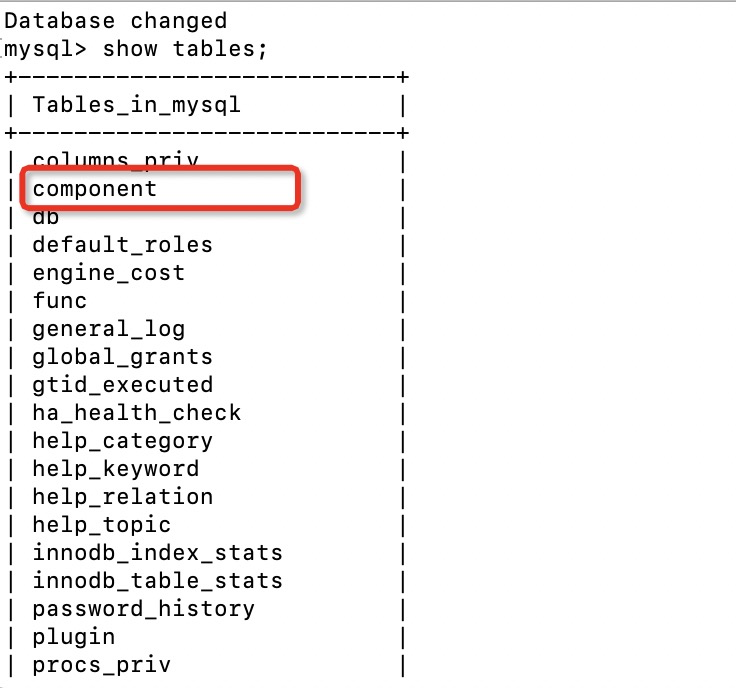
Oracle introduced Components in MySQL 8.0 and user can locate its table under mysql database. See below figure.

1EDDDCE9-B386-4EEE-954D-2742904FDCBF

What is a component and why we need it ??

Components are similar to the Plugins but are more secure and provides improved & additional features. Moreover plugins will be deprecated in future versions.

If we want “audit logs” to be enable or have strong password mechanism, a user need to install respective plugins. But there are few challenges :

1. Plugins can interact only with server but not with each other which limits its usage.
2. Plugins interact directly with server components which means they are not encapsulated .
3. While installing plugins a user needs to mention the extension file name as well. For example .so or .dll

These are some of the over head or disadvantage of plugins which a DBA normally face. I remember once I required to install an “audit” plugin and being on linux platform , it requires a “.so” file . So in this case I made ensure that I should have  “.so” extension plugin .

But components remove above mentioned challenges. Components are more secure as it is encapsulated and provides defined set of services. Major advantages are :

1. Components can interact each other.
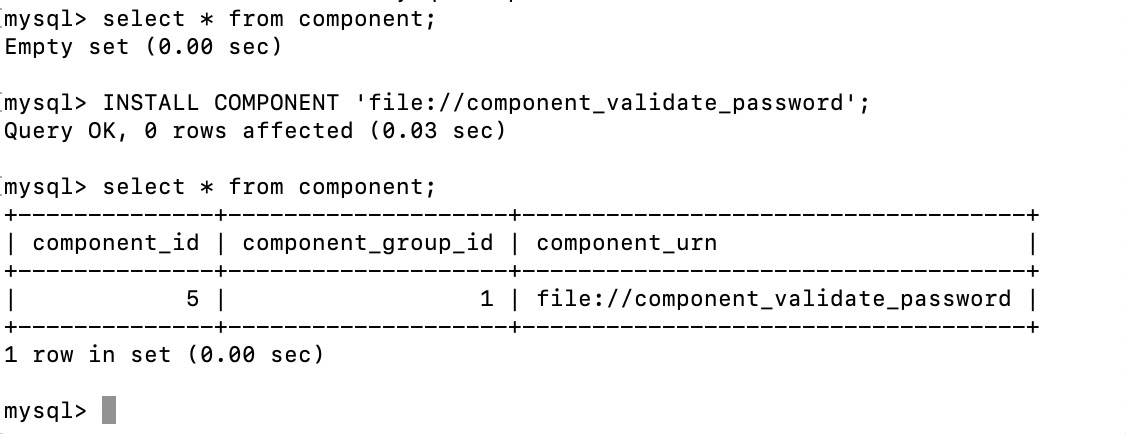
2. With components DBA doesn’t need to worry about remembering the extension file name. For example while installing “validate password” component user can simply install it as shown in below picture post which a user can check whether component has been successfully installed . Additionally we can uninstall if not required.

FAA1B240-1FA1-4C90-B8C4-DAA49EB1736E

3. A user can create his own plugins using existing macros . Some of the header for this component are as follows :

#include “validate_password_imp.h

#include <assert.h>

#include <string.h>

#include <algorithm>

#include <atomic>

#include <fstream>

#include <iomanip>

#include <set>

#include <sstream>

#include “mysql/components/library_mysys/my_memory.h

#include “mysql/components/services/mysql_rwlock.h

#include “mysql/components/services/psi_memory.h

#include “mysqld_error.h”

Respective macros can be found from MySQL distribution code

3.a After this, copy any macros of existing components and get the basic framework ready.
3.b Copy any of the service ( header file) and compile it using the source distribution of the MySQL server.

Currently below plugins are available to use. At the current moment not all components are available and thus plugins can be used in place but in future, plugins will be completely removed.

  1. Error logging
  2. Audit Messaging and logs
  3. MySQL Enterprise Data Masking and De-Identification Password Validation
  4. MySQL Enterprise Firewall
  5. Plugin API
  6. Thread Pool
  7. Version Tokens

Once enable, user can see the respective variables using “show global variables” .

Such variables starts with prefix “component name”. For  example in “validate_password”  , below are the variables which will be visible once user enable this component :

components

What about  “Audit log” component & how it is useful ??.

There are various cases when application need to append some specific string in audit logs. In such case we can use an UDF which is known as “audit_api_message_emit_udf()”.

  1. First install “audit log” component in similar manner which we used to install validate password component:

component

2. Now we wanna check if we can add some message to the audit log:

UDF_audit

If the required arguments has been passed, we will receive OK message which means that it is a success..This link provide argument required for this UDF

Hence stating this we have other components too, we can make our own also and in future it will replace the plugins. Moreover if are using plugins these days and planning to work on MySQL 8 , then you have to remove plugins as it will be going to remove in future.

What’s changed in building of Innodb’s b-tree indexes in MySQL 8

IN INNODB , EVERYTHING IS DESIGNED IN B-TREE.  When I say everything I mean primary key, Indexes, secondary index.

But have we ever thought how MySQL creates an index ? Obviously I am not saying by syntax “create index” or “alter table”. Let’s begin to start from an example by what I mean. Say, I have to create an index on table T1 having column ID with million of records in it. In prior version, mysql uses insert APIs and then index entries were inserted into the B-tree one by one. This is a traditional method to insert data in b-tree .

In the old method :

  1. First b-tree CURSOR (btr0btr.c) gets open .
  2. Search to find the correct position begins.
  3. If there is a space in page, then insert this entry into the b tree page and this has been done in optimistic locking.
  4. If there is no space in page , then pessimistic insert would be performed .For this , b-tree cursor (btr0btr.c) will need to open again and split the page and merging will be done.

This is a top down approach and it is costly because of multiple opening of b-tree cursor, searching, splitting and merging of b-tree nodes

Bottom up approach :

Lets divide new approach in 3 phase to understand :

  1. Run phase:

a.  In the run phase, Clustered or Primary index has been scanned or read, post which these entries get added to the buffer , known as sort buffer (innodb_sort_buffer_size) with default size of 262144 bytes. Until this, sorting hasn’t been done. So, you can tune this variable according to your data size to speed up the index creation. Once this buffer becomes full , all the records will be sorted and put it in a temporary file (which is explained further in the second part of this process). In addition to sort buffer size, max_sort_length also needs to be modified whenever we are making changes in sort buffer.
Remember here, I am talking about the sort_buffer_size , not the innodb_sort_buffer_size. However, when dealing with innodb engine and while creation of the secondary index online, innodb_sort_buffer_size should be consider

mysql> show global variables like '%sort_buffer%';

+-------------------------+---------+

| Variable_name           | Value   |

+-------------------------+---------+

| innodb_sort_buffer_size | 1048576 |

| myisam_sort_buffer_size | 8388608 |

| sort_buffer_size        | 262144  |

+-------------------------+---------+

3 rows in set (0.01 sec)

mysql>

2. Second phase :

Multiple temporary files, which got generated in run phase will get merged in this phase using MERGE SORT algorithm. At this stage, multiple temporary files got merged with each other. The amount of merge can be seen under the merge_passes status shown below. This status tells how many temporary files are getting merged and if this number is high enough, then it simply means that the sort buffer size is low and is a good time to tweak it.

mysql> show global status like '%passes%';
+-------------------+-------+
| Variable_name     | Value |
+-------------------+-------+
| Sort_merge_passes | 0     |
+-------------------+-------+
1 row in set (0.11 sec)

3. Third phase :

Once all file got merged , all the sorted records from second phase will be inserted into the b-tree nodes.


What’s next ?

Until this point, all these operations i.e. sort and merge is single threaded but starting from MySQL 8, these operations are now multi threaded. Think about a situation wherein you are trying to add a secondary index in your existing table using online DDL approach and you need to get it done faster or you are trying to count the number of records in a heavy table.

Now, we have two variables :

1. innodb_parallel_read_threads – Remember this is only applicable for the clustered index or PK.
2. innodb_ddl_threads – Remember this is only for the secondary index.
3. innodb_ddl_buffer_size

Take an example below to understand, how innodb_parallel_read_threads is making the clustered index read more faster as we increase the number of threads.

mysql> set local innodb_parallel_read_threads=1;
Query OK, 0 rows affected (0.00 sec)

mysql> select count(1) from fact;
+----------+
| count(1) |
+----------+
| 14531072 |
+----------+
1 row in set (2.12 sec)

mysql> set innodb_parallel_read_threads=4;
Query OK, 0 rows affected (0.00 sec)

mysql> select count(1) from fact;
+----------+
| count(1) |
+----------+
| 14531072 |
+----------+
1 row in set (0.92 sec)

mysql> set innodb_parallel_read_threads=1;
Query OK, 0 rows affected (0.00 sec)

mysql> select count(1) from fact;
+----------+
| count(1) |
+----------+
| 14531072 |
+----------+
1 row in set (2.09 sec)

However I don’t see any influential improvement in check tables.

mysql> show variables like '%parallel%';
+------------------------------+----------+
| Variable_name                | Value    |
+------------------------------+----------+
| innodb_parallel_read_threads | 1        |
| replica_parallel_type        | DATABASE |
| replica_parallel_workers     | 0        |
| slave_parallel_type          | DATABASE |
| slave_parallel_workers       | 0        |
+------------------------------+----------+
5 rows in set (0.01 sec)

mysql> check table fact;
+------------+-------+----------+----------+
| Table      | Op    | Msg_type | Msg_text |
+------------+-------+----------+----------+
| ankit.fact | check | status   | OK       |
+------------+-------+----------+----------+
1 row in set (17.53 sec)

mysql> set innodb_parallel_read_threads=4;
Query OK, 0 rows affected (0.00 sec)

mysql> check table fact;
+------------+-------+----------+----------+
| Table      | Op    | Msg_type | Msg_text |
+------------+-------+----------+----------+
| ankit.fact | check | status   | OK       |
+------------+-------+----------+----------+
1 row in set (14.23 sec)

mysql> set innodb_parallel_read_threads=8;
Query OK, 0 rows affected (0.00 sec)

mysql> check table fact;
+------------+-------+----------+----------+
| Table      | Op    | Msg_type | Msg_text |
+------------+-------+----------+----------+
| ankit.fact | check | status   | OK       |
+------------+-------+----------+----------+
1 row in set (14.48 sec)

mysql> set innodb_parallel_read_threads=12;
Query OK, 0 rows affected (0.00 sec)

mysql> check table fact;
+------------+-------+----------+----------+
| Table      | Op    | Msg_type | Msg_text |
+------------+-------+----------+----------+
| ankit.fact | check | status   | OK       |
+------------+-------+----------+----------+
1 row in set (14.35 sec)

mysql> show variables like '%parallel%';
+------------------------------+----------+
| Variable_name                | Value    |
+------------------------------+----------+
| innodb_parallel_read_threads | 12       |
| replica_parallel_type        | DATABASE |
| replica_parallel_workers     | 0        |
| slave_parallel_type          | DATABASE |
| slave_parallel_workers       | 0        |
+------------------------------+----------+
5 rows in set (0.00 sec)

mysql> set innodb_parallel_read_threads=20;
Query OK, 0 rows affected (0.00 sec)

mysql> check table fact;
+------------+-------+----------+----------+
| Table      | Op    | Msg_type | Msg_text |
+------------+-------+----------+----------+
| ankit.fact | check | status   | OK       |
+------------+-------+----------+----------+
1 row in set (14.34 sec)

mysql> 

This phase is while scanning the clustered index. Similarly if you are using the 8.0.27, innodb_ddl_threads can be used to speed up the sort and merge operations as explained one. This defines the number of threads to perform sort and merge operation. Here is the below test I performed :

mysql> alter table fact add index idx_dim2(dim2);
Query OK, 0 rows affected (19.41 sec)
Records: 0  Duplicates: 0  Warnings: 0

mysql> set innodb_ddl_buffer_size=10485760;
Query OK, 0 rows affected (0.00 sec)

mysql> set innodb_ddl_buffer_size=104857600;
Query OK, 0 rows affected (0.00 sec)

mysql> set innodb_ddl_threads=10;
Query OK, 0 rows affected (0.00 sec)

mysql> alter table fact drop index idx_dim2;
Query OK, 0 rows affected (0.01 sec)
Records: 0  Duplicates: 0  Warnings: 0

mysql> alter table fact add index idx_dim2(dim2);
Query OK, 0 rows affected (16.03 sec)
Records: 0  Duplicates: 0  Warnings: 0

mysql> set innodb_ddl_threads=12;
Query OK, 0 rows affected (0.00 sec)

mysql> set innodb_parallel_read_threads=12;
Query OK, 0 rows affected (0.00 sec)

mysql> alter table fact drop index idx_dim2;
Query OK, 0 rows affected (0.01 sec)
Records: 0  Duplicates: 0  Warnings: 0

mysql> alter table fact add index idx_dim2(dim2);
Query OK, 0 rows affected (15.89 sec)
Records: 0  Duplicates: 0  Warnings: 0

mysql> set innodb_ddl_buffer_size=1048576000;
Query OK, 0 rows affected (0.00 sec)

mysql> set innodb_parallel_read_threads=16;
Query OK, 0 rows affected (0.00 sec)

mysql> set innodb_ddl_threads=16;
Query OK, 0 rows affected (0.00 sec)

mysql> alter table fact drop index idx_dim2;
Query OK, 0 rows affected (0.01 sec)
Records: 0  Duplicates: 0  Warnings: 0

mysql> alter table fact add index idx_dim2(dim2);
Query OK, 0 rows affected (17.73 sec)
Records: 0  Duplicates: 0  Warnings: 0

With the various combinations, you can see how the performance varies.


What other things needs to consider when creating index in MySQL ?

Now , question is how much space can we reserved for index future growth per page. To achieve this, we have **innodb_fill_factor** option which will help in reserving the space for future b-tree index growth. For an example, if we have set this value to 70, then 30 percent of the space of page will get reserve for index growth during sorted index build.

This setting help us in managing server memory . Sometimes, when data becomes fragmented , setting this option can help in re-gaining it.

Conclusion

This article helps us to understand the core process behind how innodb creates an index and how with the time, things has been improved in 8. Here I have used 2 versions of MySQL to show the results. One is 8.0.26 and 8.0.32 on Mac OS.

Other articles

Some very basics of LSM tree….

This article is in continuation of my previous article on my journey from relational to distributed database. Also I talked about probabilistic data structure here. While discussing distributed databases with one of my colleague, I realised that we often miss focusing on basics and then I decided to publish this article in most simplest form.…