this is how vector indexes are faster than b-tree where it doesn't do comparison with each node

What type of databases are well suited for LLM ? part 1

This article is in continuation of my previous article related to Journey of relational to distributed and LSM. This article will often contain below words. I will try to cover its actual meaning as they will come. This article also assumes that you know about LLM ( like chatgpt) models –

  • Large language models
  • TiDB (vector supported distributed database)
  • high dimensional data
  • vector
  • semantic search
  • knowledge retrieval
  • RAG( Retrieval augmented generation )
  • Euclidean distance
  • cosine similarity
  • ANN
  • High dimensional indexes like HNSW
  • methods to perform similar searches

Let us try to understand from a use case which I was discussing with my colleagues a few days ago, and then I thought to put it down in my article in a very simple language so that everyone can understand it.

If I ask, what are the attributes of your favourite car, what will you answer ? And also let’s allocate a random number to every attribute instead of a name :

Let’s think about Honda City of white colour. What things does my Honda City have?

  1. HP of engine : 1500
  2. Car colour : 0001 ( white colour)
  3. Car length : 75
  4. Car Width : 40
  5. Number of gears : 6
  6. Cruise feature : 1
  7. Maximum speed : 400 (Kmph)
  8. Pickup speed :60
  9. Seat colour : 010
  10. Ambience light : 101
  11. Airbags :6
  12. Speakers :4
  13. Twitter : 2

    How I selected these attributes and allocated these numbers ?

Now how I selected these attributes and on what basis I allocated these numbers is a separate discussion, which is related to training models but for now you can think that it’s random and there is no such rule that only specific numbers can be provided to a specific attribute.

Going back to the topic, if I combine all these numbers, it looks like a list of numbers :

{1500,0001,75,40,6,1,400,60,010,101,6,4,2}

This becomes a vector representation of my Honda City, and every attribute refers to a dimension. If I keep on adding more attributes of the car, it becomes high-dimensional data, i.e it has got high number of attributes.

Do I need a separate data type for this ?

Yes, like varchar, we do have a VECTOR data type. See below. Please note that database I used here is TiDB

mysql> show create table cars;
+-------+------------------------------------------------------------------------------------------------------------------------------------------------------+
| Table | Create Table                                                                                                                                         |
+-------+------------------------------------------------------------------------------------------------------------------------------------------------------+
| cars  | CREATE TABLE `cars` (
  `name` char(10) DEFAULT NULL,
  `car_vector` vector DEFAULT NULL
) ENGINE=InnoDB DEFAULT CHARSET=utf8mb4 COLLATE=utf8mb4_bin |
+-------+------------------------------------------------------------------------------------------------------------------------------------------------------+
1 row in set (0.00 sec)

Is this data type available in traditional databases ?

Storing these array or list of numbers or vector in traditional databases like Postgres/MySQL as varchar , is possible, but if I try to find similar products then I can’t perform a similarity search. One obvious question comes to mind about using “Like operator“, but that performs text-based searching on a specific pattern and can’t give similar data.

Let’s go into more detail on implementing it in traditional databases and understand why it won’t work-

Let’s add one more car. Say, you have a Red Hyundai Verna whose vector representation can be –

verna – {1500,0011,75,40,6,1,300,50,100,110,4,3,1}

and my city was – {1500,0001,75,40,6,1,400,60,010,101,6,4,2}

If we perform the euclidean distance ( to search for similar products ) then we will see that both items are quite close and thus can be called similar. I can use multiple mathematical functions to do this, but the real problem is SCALE. You cannot handle multiple such operations at the scale of such a million records.

mysql> insert into cars values ('city_sedan','[1500,1,75,40,6,1,400,60,10,101,6,4,2]');
Query OK, 1 row affected (0.02 sec)

mysql> insert into cars values ('vern_sedan','[1500,1,79,40,6,1,450,60,10,101,3,2,1]');
Query OK, 1 row affected (0.01 sec)

That’s where the vector database knocks in ? Can we use TiDB, which is a distributed database and supports vector datatype with HNSW, ANN , euclidean distance and cosine ?

They calculate the similarity search using multiple methods, but not limited to below.

  1. Search on the same 2D-3D axis or multi-dimensional axis.
  2. Magnitude search ( not only subtraction of numbers ) i.e cosine search

Let’s try to perform some search using euclidean distance in TiDB, which works on below fundamental.

(vectorA1- vectorA2)^2 +  (vectorB1- vectorB2)^2
sqroot(vector A + vector B)

Think about a situation wherein you need to find a car, which is similar to your given vector input. I have decided to give an input of high end speed cars –

mysql> SELECT name,VEC_L2_DISTANCE(car_vector,'[5000,10,19,400,60,10,330,600,100,1001,30,20,10]') from cars;
+------------+--------------------------------------------------------------------------------+
| name       | VEC_L2_DISTANCE(car_vector,'[5000,10,19,400,60,10,330,600,100,1001,30,20,10]') |
+------------+--------------------------------------------------------------------------------+
| city_sedan |                                                             3674.4128782704865 |
| vern_sedan |                                                             3675.8008651176956 |
+------------+--------------------------------------------------------------------------------+
2 rows in set (0.00 sec)

Above is the distance of the input from the available vectors. Now here we can do the filtering :

mysql> SELECT name,VEC_L2_DISTANCE(car_vector,'[5000,10,19,400,60,10,330,600,100,1001,30,20,10]') from cars where VEC_L2_DISTANCE(car_vector,'[5000,10,19,400,60,10,330,600,100,1001,30,20,10]') < 100;
Empty set (0.00 sec)

This means there is no car we have which is near 100 distance. This value of 100 is specific to the need that at what threshold we want to setup our similar search.

Not all databases which support vector datatype can be called as fully vector DB.

For example MySQL 9 supports VECTOR as a data type, but still it needs time to get mature as it can’t be completely called as vector database because it still cant scale well to millions and billions of records and also the absence of required indexes for vector search makes it less efficient for billions of search. Moreover, what MySQL supports as a part of the method to perform similarity search is Euclidean distance but not COSINE support ( which is good for DNA search ).

So what we learnt until now –

  1. What is similarity search ?
  2. How these searches are being implemented ?
  3. Why traditional databases are not efficient for these purposes even though they are supporting it ?
  4. What is vector and methods to do it ?
  5. Indexes for vector data types

Can’t we use B-tree indexes on these data types ?

We all worked on Btree, but it is not well suited for similarity search at such a large scale, and this is where HNSW search knocks in, and it is blazing fast because the amount of comparison is very, very less, and it doesn’t focus on exact match but similar by creating layers.

So now going back to our question “what databases are well suited for LLM” . LLM ( like chat gpt or deepseek) uses RAG to get more data from knowledge, and this knowledge needs to be stored, and this store can be vector.

In 2nd phase of this article, I will do the implementation on TiDB to see how it actually works.

Some very basics of LSM tree….

Basics

This article is in continuation of my previous article on my journey from relational to distributed database. Also I talked about probabilistic data structure here.

While discussing distributed databases with one of my colleague, I realised that we often miss focusing on basics and then I decided to publish this article in most simplest form. However it’s my long pending article which I already wrote few years ago but never published it.

Let’s talk about LSM tree.

In this type of file system, data will be keep on appending to the existing file i.e. it will not overwrite the data ( like we do with b-trees). Data first will be written in the memory ( known as mem tables ) only upto a defined threshold say 10M and once it reaches the limit, the data will be flushed.

LSM uses the concept of LFS which just append the changes (update/insert/delete) i.e. it won’t replace or change the existing record making it as a good option for heavy write work loads in database scenario.

Log structured means that I am writing some logs without modifying the related previous data and just keep on writing one after the other.

Merge is an algorithm to merge the data which is managing this log data.

Tree means different levels of the data i.e. storing the data in a hierarchical order. We can think of our computer hardisk in which we have partitioned the data into different level . The more upper level (having less data) is faster to access and as we go more deeper i.e. lower level is time consuming task (containing more data )

LSM works on different levels which means it maintains data at different levels. Lets try to understand by referring below points.

1st stage and later in writing

1st stage is the memory stage wherein we are having memtables or the memory area ( have explained in later section ). Here data needs to be in the sorted order as per the primary key defined in the table

L0 – level at the storage which contains the data being flushed from the memtable to a stable file in a sorted order. This level contains various sstables ( i.e sorted string tables and known as SST ) and in this level we may experience some duplicate keys (for example a,b,c in s1 table and a,b,c,d is s2 table wherein a,b,c are duplicate keys) . This duplication occurs because of the plain dump received from the memtable and any duplicate data will be deleted at the later stage as a background task.

The SSTable files at Level 1 and above are organized to contain only non-overlapping keys by design.

Have you also heard the word COMPACTION ? let’s understand, what’s that .

COMPACTION is a process wherein SST from level 0 get further combined to form lesser number of SST by removing the overlapping keys/deleted data/ data which has been changed. Obviously this process consume CPU.

What about read operation in LSM tree ?

For read purpose LSM uses binary search algorithm ( which i’m not going to cover in detail as it would be out of context). If we don’t run compaction, it will eventually be impacting the read performance as you can see that the seek will have to go through multiple levels of SSTs.

Did I mention about memtable ?

MemTable is an in-memory data structure holding data before they are flushed to SST files (on disk). It serves both read and write – new writes always insert data to memtable, and reads has to query memtable before reading from SST files, because data in memtable is newer. Once a memtable is full, it becomes immutable and replaced by a new memtable. A background thread will flush the content of the memtable into a SST file, after which the memtable can be destroyed

What all databases uses this ?

Databases like MyRocks, TiDB, Cassandra often uses LSM tree.

Im keeping this article short and concise without writing much more detail as purpose for this article is to make user understand the basics. Writing more content will defeat its purpose.

Who said nothing to do when migrating your character set from MySQL 5.7 to 8 ?

As you know that MySQL 5.7 is going to be in its end of life this month and many businesses are upgrading to 8 ( except few ones, believe me its true) . Many cloud vendors are providing extra support and time to their customer so that they can move to 8. One of the major change in 8 is the default character type and collation. Previously the default one was latin1 and also the alias of utf8 was utf8mb3 but now it is utf8mb4. There are plenty of articles from many database service providers that says no data and table structural changes are required. Although it is true to some extent but there are some major changes, if being missed can cause your application to behave weirdly.

Lets go basic first !!

What is a character set ?

A character is a letter, let say A,B,C . Now I want to encode these letters i.e. A can be represented by the ! and B can be represented by the $. If I combine the letter and their encoding it can be called as a character set.

There are total 41 character set in 8.0.33. I wont go in detail of every character set as this is out of topic but still if you are more interested in reading about it, this is a manual. This link will also explain how utf8mb4 is different from the utf8mb3 and other character set and how man bytes does it take to store a single character.

mysql> select version();
+-----------+
| version() |
+-----------+
| 8.0.33    |
+-----------+
1 row in set (0.00 sec)
mysql> select count(1) from information_schema.CHARACTER_SETS;
+----------+
| count(1) |
+----------+
|       41 |
+----------+
1 row in set (0.00 sec)

What is a collation ?

Above I mentioned that if I replace A by ! , then I am imposing rule . This rule is called as a collation. This is a very simple type of collation. Collation can be much more complex, depending on the type of rules one have created.

In total there are 286 collations in 8.0.33. There can be multiple types of collation for one character set and one

mysql> select count(*) from COLLATIONS;
+----------+
| count(*) |
+----------+
|      286 |
+----------+
1 row in set (0.00 sec)
mysql> select version();
+-----------+
| version() |
+-----------+
| 8.0.33    |
+-----------+
1 row in set (0.00 sec)

Each collation has a property which talks about the PAD_ATTRIBUTE i.e. if a string can have trailing space as its own part (without considering it separate) or should it be treated as its additional character. It may sounds confusing now but I will clear it further as this is a main topic of this article.

How pad attribute makes the difference while upgrading ?

In many cases if we were using latin1 or utf8 (which was an alias of utf8mb3) as the character set of our tables in 5.7, most probably we are using latin1_swedish_ci or utf8mb3_general_ci as its collation type because these are the default one and rarely we do change it until unless we have some specific business needs. Now lets talk about a case wherein we have a table with character set as utf8mb3

mysql> show create table check_mb3\G;
*************************** 1. row ***************************
       Table: check_mb3
Create Table: CREATE TABLE `check_mb3` (
  `id` int DEFAULT NULL,
  `name` char(10) DEFAULT NULL,
  UNIQUE KEY `name` (`name`)
) ENGINE=InnoDB DEFAULT CHARSET=utf8mb3
1 row in set (0.01 sec)
mysql> insert into check_mb3 values(1,'ankit');
Query OK, 1 row affected (0.00 sec)
mysql> insert into check_mb3 values(1,'ankit ');
ERROR 1062 (23000): Duplicate entry 'ankit' for key 'check_mb3.name'
mysql> insert into check_mb3 values(2,'guga');
Query OK, 1 row affected (0.00 sec)
mysql> insert into check_mb3 values(3,'guga ');
ERROR 1062 (23000): Duplicate entry 'guga' for key 'check_mb3.name'
mysql> insert into check_mb3 values(4,'victor');
Query OK, 1 row affected (0.00 sec)
mysql> insert into check_mb3 values(5,'victor ');
ERROR 1062 (23000): Duplicate entry 'victor' for key 'check_mb3.name'

Until now, everything is fine and we are not able to insert the same string even if it has trailing spaces. Now lets try to migrate our tables to 8 without worrying about the pad spaces.

mysql> alter table check_mb3 CHARACTER SET UTF8mb4;
Query OK, 0 rows affected (0.01 sec)
Records: 0  Duplicates: 0  Warnings: 0
mysql> alter table check_mb3 modify name char(10) CHARACTER SET utf8mb4 collate utf8mb4_0900_ai_ci;
Query OK, 3 rows affected (0.03 sec)
Records: 3  Duplicates: 0  Warnings
mysql> show create table check_mb3\G;
*************************** 1. row ***************************
       Table: check_mb3
Create Table: CREATE TABLE `check_mb3` (
  `id` int DEFAULT NULL,
  `name` char(10) CHARACTER SET utf8mb3 DEFAULT NULL,
  UNIQUE KEY `name` (`name`)
) ENGINE=InnoDB DEFAULT CHARSET=utf8mb4 COLLATE=utf8mb4_0900_ai_ci
1 row in set (0.00 sec)
mysql> insert into check_mb3 values(4,'victor ');
ERROR 1062 (23000): Duplicate entry 'victor' for key 'check_mb3.name'
mysql> select * from check_mb3;
+------+--------+
| id   | name   |
+------+--------+
|    1 | ankit  |
|    2 | guga   |
|    3 | victor |
+------+--------+
3 rows in set (0.00 sec)

OOPS !!, we didn’t expect this, but anyhow we are fine in this case when we are using data type as char but lets think of a use case wherein our application expect that every string is ending with a trailing space and we try to insert the data with a trailing space –

mysql> insert into check_mb3 values(7,'ankittf84 ');
Query OK, 1 row affected (0.01 sec)
mysql> select * from check_mb3 where name='ankittf84 ';
Empty set (0.00 sec)

Here our application start behaving weird. However if we do same in utf8mb3 collation, the above read will return the data.

mysql> show create table check_mb3_again;
+-----------------+--------------------------------------------------------------------------------------------------------------------------------------------------------------------------------------------------------------------------------------------+
| Table           | Create Table                                                                                                                                                                                                                               |
+-----------------+--------------------------------------------------------------------------------------------------------------------------------------------------------------------------------------------------------------------------------------------+
| check_mb3_again | CREATE TABLE `check_mb3_again` (
  `id` int DEFAULT NULL,
  `name` char(10) CHARACTER SET utf8mb3 COLLATE utf8mb3_general_ci DEFAULT NULL,
  UNIQUE KEY `name` (`name`)
) ENGINE=InnoDB DEFAULT CHARSET=utf8mb4 COLLATE=utf8mb4_0900_ai_ci |
+-----------------+--------------------------------------------------------------------------------------------------------------------------------------------------------------------------------------------------------------------------------------------+
1 row in set (0.00 sec)
mysql> insert into check_mb3_again values (1,'ankit ');
Query OK, 1 row affected (0.00 sec)
mysql> select * from check_mb3_again where name='ankit ';
+------+-------+
| id   | name  |
+------+-------+
|    1 | ankit |
+------+-------+
1 row in set (0.00 sec)

But major question is how migration will be impacted when writing the data ?

Lets take another case of below table –

mysql>  CREATE TABLE check_mb3_again_withvarchar (name varchar(10)) character set utf8mb3 collate utf8mb3_general_ci ;
Query OK, 0 rows affected, 2 warnings (0.02 sec)
mysql> alter table check_mb3_again_withvarchar modify name varchar(10) unique key;
Query OK, 0 rows affected (0.01 sec)
Records: 0  Duplicates: 0  Warnings: 0
mysql> insert into check_mb3_again_withvarchar values('ankit');
Query OK, 1 row affected (0.01 sec)
mysql> insert into check_mb3_again_withvarchar values('ankit ');
ERROR 1062 (23000): Duplicate entry 'ankit ' for key 'check_mb3_again_withvarchar.name'

So this is expected that even if application or web, sends the same string with trailing space, it will be rejected. Now its time to migrate the table to 8 using mb4 collation.

mysql> alter table check_mb3_again_withvarchar charset utf8mb4;
Query OK, 0 rows affected (0.01 sec)
Records: 0  Duplicates: 0  Warnings: 0
mysql> alter table check_mb3_again_withvarchar modify name varchar(10) CHARACTER SET utf8mb4 collate utf8mb4_0900_ai_ci;
Query OK, 1 row affected (0.02 sec)
Records: 1  Duplicates: 0  Warnings: 0
mysql> show create table check_mb3_again_withvarchar;
+-----------------------------+----------------------------------------------------------------------------------------------------------------------------------------------------------------------------------------------------------------------------------+
| Table                       | Create Table                                                                                                                                                                                                                     |
+-----------------------------+----------------------------------------------------------------------------------------------------------------------------------------------------------------------------------------------------------------------------------+
| check_mb3_again_withvarchar | CREATE TABLE `check_mb3_again_withvarchar` (
  `name` varchar(10) CHARACTER SET utf8mb4 COLLATE utf8mb4_0900_ai_ci DEFAULT NULL,
  UNIQUE KEY `name` (`name`)
) ENGINE=InnoDB DEFAULT CHARSET=utf8mb4 COLLATE=utf8mb4_0900_ai_ci |
+-----------------------------+----------------------------------------------------------------------------------------------------------------------------------------------------------------------------------------------------------------------------------+
1 row in set (0.00 sec)

Ok, so we have migrated the table successfully, lets continue with our writes –

mysql> insert into check_mb3_again_withvarchar values('ankit ');
Query OK, 1 row affected (0.00 sec)
mysql> select * from check_mb3_again_withvarchar;
+--------+
| name   |
+--------+
| ankit  |
| ankit  |
+--------+
2 rows in set (0.00 sec)

OOPS !! so we fall in a trap wherein application didn’t realise and a duplicate record (of varchar data type) has been inserted successfully.

How to solve this ?

As I mentioned before that there are multiple collations being supported by one character set, we can select the one we need. By “need” I mean several factors like the type of character we need, do we need to compare the strings without spaces or with spaces.

Considering the specific case mentioned in this topic, if we are looking to opt utf8mb4 but with PAD SPACES, we can choose one from collation table. Also we can design our own collation which is not a part of this topic.


So, what is important ?

It is extremely important to understand the behaviour of your data and how does the write operations actually writing the data before planning your migration as such issues looks invisible in beginning but after few months or years, it mess up your data. So, yes deciding character set and collation is extremely important for your data.

Meet me here on linkedin.

Note – These are my own thoughts and doesnt represent the thoughts of my employer in anyway.


Redo flushing. MySQL VS Postgres and Redo in 8/9

One of my earlier post MySQL Innodb – Internal Transaction flow and its related video talks about a transaction flow which gives the internal concept of transaction flow in Innodb. In this article I am going to talk about how the Redo log ( WAL in PG ) flushing is different in MySQL and Postgres and…

About the future of system variables in MySQL

Yesterday I was working on performance schema to troubleshoot a replication issue and my eyes stopped on 2 new additional tables starting 8.0 onwards which I felt quite useful in some cases and these 2 tables are mentioned below. However, this is not the main topic of this article but I will cover a high level introduction of them.

persisted_variables
variables_info

What’s old ? You might be knowing already.


Those who doesn’t know about persisted variables, it let you persist the “modified global variables” even after a mysqld restart i.e. you doesn’t need to go to the my.cnf file and make changes in it. Lets try to understand with an example:

mysql> SET PERSIST max_connections = 200;

Query OK, 0 rows affected (0.01 sec)

mysql> show global variables like '%max_connection%';
+------------------------+-------+
| Variable_name          | Value |
+------------------------+-------+
| max_connections        | 200   |
| mysqlx_max_connections | 100   |
+------------------------+-------+

Checking the mysqld-auto.cnf (resides in the data directory having a json based format)

cat mysqld-auto.cnf

{"Version": 2, "mysql_dynamic_parse_early_variables": {"max_connections": {"Value": "200", "Metadata": {"Host": "localhost", "User": "root", "Timestamp": 1685521797329463}}}}

After this, if we restart our mysqld, you will notice that your changes are persisted now.

What about performance schema table I mentioned above ?

Talking about variables_info table, if we would like to see which user has changed the value of a variable and at what time so that we can dig down any issues like max_connection, purge_thread, buffer_pool size, auditing and so on. Here I must see this table :

mysql> select * from performance_Schema.variables_info where variable_name like '%max_connections%'\G;
*************************** 1. row ***************************
  VARIABLE_NAME: max_connections
VARIABLE_SOURCE: DYNAMIC
  VARIABLE_PATH: 
      MIN_VALUE: 1
      MAX_VALUE: 100000
       SET_TIME: 2023-05-31 14:18:46.893137
       SET_USER: root
       SET_HOST: localhost
*************************** 2. row ***************************
  VARIABLE_NAME: mysqlx_max_connections
VARIABLE_SOURCE: COMPILED
  VARIABLE_PATH: 
      MIN_VALUE: 1
      MAX_VALUE: 65535
       SET_TIME: NULL
       SET_USER: NULL
       SET_HOST: NULL
2 rows in set (0.01 sec)

What’s new in 8.0.29 ?

Coming down to our main topic. Starting 8.0.29 we will be able to secure sensitive variables which will be storing data like passwords, key rings etc and even apply the access level security on them. At this moment, there are no such variables but we should remember that to use such variables, we need to enable component keyring_file which will help us to secure these variables once they will be introduced. In this blog I have explained how to install components.

mysql> install component 'file://component_keyring_file';
Query OK, 0 rows affected (0.02 sec)

mysql> use mysql;
Reading table information for completion of table and column names
You can turn off this feature to get a quicker startup with -A

Database changed
mysql>  select * from component;
+--------------+--------------------+-------------------------------+
| component_id | component_group_id | component_urn                 |
+--------------+--------------------+-------------------------------+
|            5 |                  1 | file://component_keyring_file |
+--------------+--------------------+-------------------------------+
1 row in set (0.00 sec)

mysql> show global variables like '%keyring%';
+--------------------+-------+
| Variable_name      | Value |
+--------------------+-------+
| keyring_operations | ON    |
+--------------------+-------+

Talking about how can we encrypt these variables and control its access, we have two options :

Are these useful ?

Once there will be some sensitive variable and if we are using it, we need to be extra cautious about them so that this data won’t be visible to any users. Additionally, master key ring needs to be rotated occasionally to make this more secure. Secondly, sensitive variables should be put in OFF state so that in case if data won’t be encrypted, mysqld wont restart. Still, it will be too early to comment on anything.

Other posts –

Components in MySQL 8

This article discuss about the less discussed topic of MySQL 8 . Read about components in mysql and how it is differ from plugins.

Leadership principles at simplifieDB

At simplifieDB, we follow below principles in our daily job routine.

  1. If you write your problems very clearly, its half solved.
  2. Be pellucid about your work. Keep digging down.
  3. Customer obsession is not greater than your family’s obsession. Make balance.
  4. Success of our customer is success of our business.
  5. Perfection is not always required. Be first.
  6. Enjoy your work and keep things simple.
  7. Don’t worry too much. We together will find out the solution.
  8. Always listen ideas/solutions of your colleague. Don’t just reject.
  9. Always share, what you learnt today. This will help you and everyone grow.
  10. Don’t disagree about a solution, just because of your ego. Remember the target, not ego.

Read our most popular blogs

Some very basics of LSM tree….

This article is in continuation of my previous article on my journey from relational to distributed database. Also I talked about probabilistic data structure here. While discussing distributed databases with one of my colleague, I realised that we often miss focusing on basics and then I decided to publish this article in most simplest form.…

Database Architecture that empowered CCTNS. Episode 1.

I am covering this article in multiple articles and will keep everyone short so that readers won’t feel bored.


Note – These thoughts are nowhere linked with any of my employers or not even being influenced by them or not even linked with any governments. It DOES NOT contain any confidential information. It is purely my own technical write-up. The only and only purpose of this article is for those who are keen to learn more about database architectures and the possible scenarios one can face while designing.

Before I start the technical discussion, I must tell you about the CCTNS. CCTNS stands for Crime and Criminal tracking network and system, which is an Indian government initiative back in 2009 by the Ministry of home affairs (MHA). Under this project, our main aim is to set up the database architecture for more than 15,000+ police stations across the country in such a way where we can achieve some of the below-mentioned points (but not limited to).

How and which database we opted for?

Back in 2014 end, there were not many DBAAS solutions, and databases like Oracle, and SQL servers were at their peak we really wanted to avoid them because of the expensive solutions they provide and rather preferred to choose open-source databases like MySQL and other open-source databases. With my experience, I have been asked to evaluate it, based on how efficiently and simply are they storing the data. During the evaluation, I have taken MySQL’s InnoDB storage engine (instead of MyISAM) because of its ACID nature ( although there are various debates about whether InnoDB supports ACID) since we were also dealing with the transactional data, granular level locking, foreign key constraints, etc.

While studying I realized that Innodb stores data in the Primary key format and the secondary index is also linked with the primary key only i.e. non-pk rows acting as the pointer to the primary keys and even if you are not creating any PK in your table, InnoDB itself creates 6 bytes of PK ( in the absence of unique key). Hence, it becomes quite easy to navigate to the specific page while reading the data since pages are using link lists to navigate to the adjacent or required page and also data is clustered with the primary key. I am not going into the details of the InnoDB storage architecture as it is out of topic. Moreover, it is quite easy to navigate within the data directory of MySQL since it was quite easy to understand. Considering these thoughts along with many other points after evaluating the other open source databases, we have decided to move with MySQL and the available version was MySQL 5.6.

The complexity of the database servers and the challenges we had

Since there were more than 15,000+ police stations across the nation and counting, we needed to set up a strong replicated environment. As all of these police stations were storing various FIRs and related updates to it at various intervals, we need to make ensure that :

1. The writes and updates won’t be affected by the spike in the number of connections.

2. Database should be available all of the time to accept connections.

3. Storage should not be a blocker since we were storing BLOB and text data extensively

4. Since the data needs to be replicated instantly and stale data on the read nodes should be avoided, we required a solution that can be satisfied by the combination of semi and async replication.

5. A warehouse server that can connect with all database servers and thus keep on replicating from it since this is required for various management purposes by the Government of India.


PS is a police station in every district and every district has multiple police stations ( and increasing ).
There are multiple districts in a city which further multiples the number of police stations.
There are multiple cities in a state (except union territory)
There are 28 states and 8 union territories in my beloved INDIA.

Here are the questions we had when we saw an abundance amount of data:

1. Whether to have one MySQL instance of all police stations belonging to a city or should we implement the sharding considering a unique police station number as the shard key. Please note that in MySQL, Schema is a synonym to the Database which is not in the case of databases like Oracle and one instance means one mysqld process.

2. If we go for the primary solution, then the overhead of maintaining multiple numbers of databases would be there. Although there is no hard limit on the maximum number of databases in MySQL unless there is a restriction at the OS level i.e. the file descriptors. Read it here.

3. If we go for the secondary one, then the overhead of maintaining servers which we really wanted to avoid since starting.

Let’s see what all comes into our mind :


In the next subsequent series, I will showcase the architecture in form of a diagram and how we overcome these challenges ( not limited to) to create such a large database Architecture. I will also cover what other limitations we had in MySQL 5.6 and how we overcome those without moving to 5.7 and how we did upgrades later on and most importantly how we made our replication more mature.

Latest blogs

Hash partitioning and its role in distributed systems – 1

Have you ever divided a single physical book into rather sub-books because the book was too heavy and it is not even easy to quickly navigate to a specific page?

Similarly, partitioning a table is like you are dividing one physical table into various sub-tables (on the same storage and same data directory) to have better storage management, better performance (in some cases), and better archival policies. We can partition a table in various ways. The process is, first we have to choose a partitioning key or partitioning keyS i.e. a composite partition key in which multiple columns are involved. By partitioning key I mean we need to choose a column/columns basis on which we can divide the table.

Let’s say we have the below popular table employees_range. This table is divided into two sub-parts i.e. p0 and p1. If you insert a record with an id less than 100, that particular record will insert in the p0 partition. This is the simplest form of partitioning we can have in our database server and is known as range partitioning. However such type of partitioning has already been covered by multiple articles and is not a topic to be covered under this article.

Whenever you are creating a partition, table structure matters a lot. For example, if you have a primary key and a unique key in the table and you are planning to partition your table, then the partition key should be present in all the keys i.e. either a unique key or as a primary key.

This blog is focused on hash partitioning. If you will understand this, you can also replicate your understanding in the distributed systems where database is sharded into several shards and you can also understand that how data is being written into the respective shards.

Hash partition :

create table t1 (col1 int not null,col2 date not null,col3 int not null,col4 int not null,unique key(col1,col2,col3)) partition by hash(col3) partitions 4;

This will divide the table into 6 different sub tables.Numeric 6 means the number of partitions we need. In hash partitioning we doesn’t define the path of data explicitly (by path of data I mean, in which partition, a particular insertion shall take place) as we do in the range partitioning. Hash is a function in computer science/math which transforms an arbitrary string into a fixed size of output.

Now hashing can be of different types.

MySQL, by default uses modulous hashing (linear hashing is different) i.e. x % y where x is the value of partitioning key and y is the number of partition . For example 9 % 5 which means divide 9 by 5 will give remainder as 4 so that will be the hashing. Similarly in above example hashing will be based on the col3 values. Lets try to insert some value

mysql> insert into t1 values (1,NOW(),300,1);
Query OK, 1 row affected, 1 warning (0.00 sec)
mysql> insert into t1 values (1,NOW(),191,1);
Query OK, 1 row affected, 1 warning (0.01 sec)

mysql> insert into t1 values (1,NOW(),0,1);
Query OK, 1 row affected, 1 warning (0.00 sec)


mysql> select * from t1 partition(p3);
+------+------------+------+------+

| col1 | col2       | col3 | col4 |

+------+------------+------+------+

|    1 | 2024-04-01 |  191 |    1 |

+------+------------+------+------+

1 row in set (0.00 sec)

mysql> select * from t1 partition(p0);
+------+------------+------+------+

| col1 | col2       | col3 | col4 |

+------+------------+------+------+

|    1 | 2024-04-01 |    0 |    1 |

|    1 | 2024-04-01 |  300 |    1 |

+------+------------+------+------+
2 rows in set (0.00 sec)


300/4 = 0 , so that means data will insert in the first partition.
191/4=3, this will go in 3rd partition
0/4=0, this will go in first partition.

This is the most simplest form of partitioning you will encounter. Same concept can also be applied on multi-tenant databases where databases or tables has been sharded into different servers. See this diagram below


Choosing the definition of hashing can surely impact the write speed of query. If hashing is complex, it will affect the performance. Lets try to use some complex hashing algorithm in the next section.

Latest Articles

Components in MySQL 8

This article is purely based on my understanding of Components and the outcome of my dirty hands. Reference of this Article is “MySQL official documents” & my experience with components.

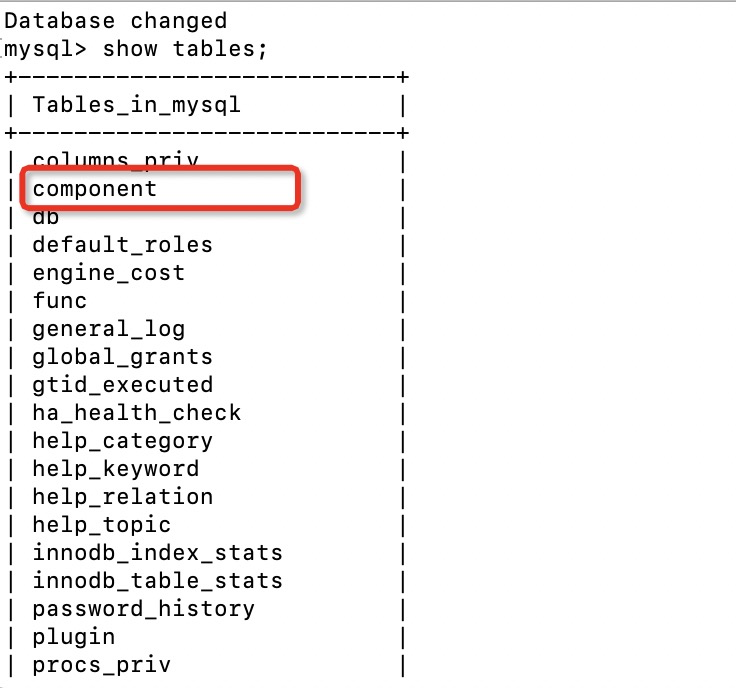
Oracle introduced Components in MySQL 8.0 and user can locate its table under mysql database. See below figure.

1EDDDCE9-B386-4EEE-954D-2742904FDCBF

What is a component and why we need it ??

Components are similar to the Plugins but are more secure and provides improved & additional features. Moreover plugins will be deprecated in future versions.

If we want “audit logs” to be enable or have strong password mechanism, a user need to install respective plugins. But there are few challenges :

1. Plugins can interact only with server but not with each other which limits its usage.
2. Plugins interact directly with server components which means they are not encapsulated .
3. While installing plugins a user needs to mention the extension file name as well. For example .so or .dll

These are some of the over head or disadvantage of plugins which a DBA normally face. I remember once I required to install an “audit” plugin and being on linux platform , it requires a “.so” file . So in this case I made ensure that I should have  “.so” extension plugin .

But components remove above mentioned challenges. Components are more secure as it is encapsulated and provides defined set of services. Major advantages are :

1. Components can interact each other.
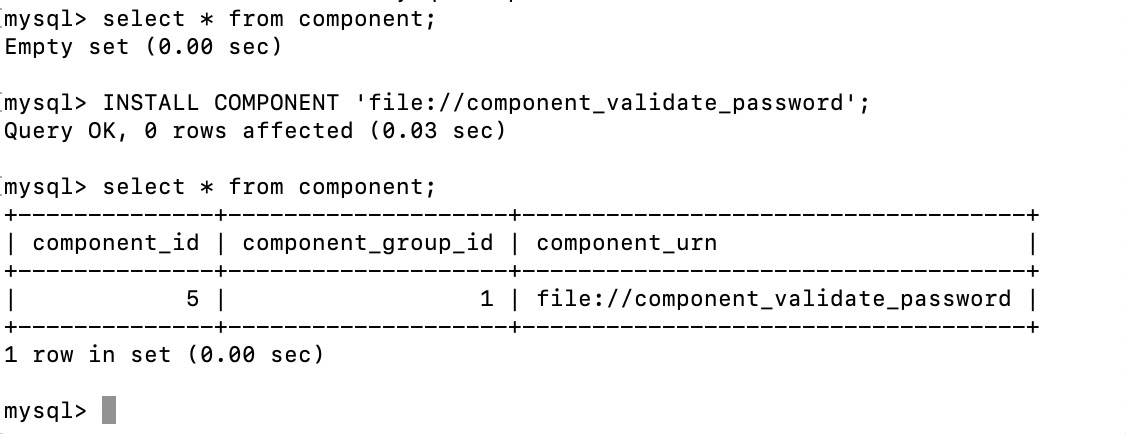
2. With components DBA doesn’t need to worry about remembering the extension file name. For example while installing “validate password” component user can simply install it as shown in below picture post which a user can check whether component has been successfully installed . Additionally we can uninstall if not required.

FAA1B240-1FA1-4C90-B8C4-DAA49EB1736E

3. A user can create his own plugins using existing macros . Some of the header for this component are as follows :

#include “validate_password_imp.h

#include <assert.h>

#include <string.h>

#include <algorithm>

#include <atomic>

#include <fstream>

#include <iomanip>

#include <set>

#include <sstream>

#include “mysql/components/library_mysys/my_memory.h

#include “mysql/components/services/mysql_rwlock.h

#include “mysql/components/services/psi_memory.h

#include “mysqld_error.h”

Respective macros can be found from MySQL distribution code

3.a After this, copy any macros of existing components and get the basic framework ready.
3.b Copy any of the service ( header file) and compile it using the source distribution of the MySQL server.

Currently below plugins are available to use. At the current moment not all components are available and thus plugins can be used in place but in future, plugins will be completely removed.

  1. Error logging
  2. Audit Messaging and logs
  3. MySQL Enterprise Data Masking and De-Identification Password Validation
  4. MySQL Enterprise Firewall
  5. Plugin API
  6. Thread Pool
  7. Version Tokens

Once enable, user can see the respective variables using “show global variables” .

Such variables starts with prefix “component name”. For  example in “validate_password”  , below are the variables which will be visible once user enable this component :

components

What about  “Audit log” component & how it is useful ??.

There are various cases when application need to append some specific string in audit logs. In such case we can use an UDF which is known as “audit_api_message_emit_udf()”.

  1. First install “audit log” component in similar manner which we used to install validate password component:

component

2. Now we wanna check if we can add some message to the audit log:

UDF_audit

If the required arguments has been passed, we will receive OK message which means that it is a success..This link provide argument required for this UDF

Hence stating this we have other components too, we can make our own also and in future it will replace the plugins. Moreover if are using plugins these days and planning to work on MySQL 8 , then you have to remove plugins as it will be going to remove in future.

What’s changed in building of Innodb’s b-tree indexes in MySQL 8

IN INNODB , EVERYTHING IS DESIGNED IN B-TREE.  When I say everything I mean primary key, Indexes, secondary index.

But have we ever thought how MySQL creates an index ? Obviously I am not saying by syntax “create index” or “alter table”. Let’s begin to start from an example by what I mean. Say, I have to create an index on table T1 having column ID with million of records in it. In prior version, mysql uses insert APIs and then index entries were inserted into the B-tree one by one. This is a traditional method to insert data in b-tree .

In the old method :

  1. First b-tree CURSOR (btr0btr.c) gets open .
  2. Search to find the correct position begins.
  3. If there is a space in page, then insert this entry into the b tree page and this has been done in optimistic locking.
  4. If there is no space in page , then pessimistic insert would be performed .For this , b-tree cursor (btr0btr.c) will need to open again and split the page and merging will be done.

This is a top down approach and it is costly because of multiple opening of b-tree cursor, searching, splitting and merging of b-tree nodes

Bottom up approach :

Lets divide new approach in 3 phase to understand :

  1. Run phase:

a.  In the run phase, Clustered or Primary index has been scanned or read, post which these entries get added to the buffer , known as sort buffer (innodb_sort_buffer_size) with default size of 262144 bytes. Until this, sorting hasn’t been done. So, you can tune this variable according to your data size to speed up the index creation. Once this buffer becomes full , all the records will be sorted and put it in a temporary file (which is explained further in the second part of this process). In addition to sort buffer size, max_sort_length also needs to be modified whenever we are making changes in sort buffer.
Remember here, I am talking about the sort_buffer_size , not the innodb_sort_buffer_size. However, when dealing with innodb engine and while creation of the secondary index online, innodb_sort_buffer_size should be consider

mysql> show global variables like '%sort_buffer%';

+-------------------------+---------+

| Variable_name           | Value   |

+-------------------------+---------+

| innodb_sort_buffer_size | 1048576 |

| myisam_sort_buffer_size | 8388608 |

| sort_buffer_size        | 262144  |

+-------------------------+---------+

3 rows in set (0.01 sec)

mysql>

2. Second phase :

Multiple temporary files, which got generated in run phase will get merged in this phase using MERGE SORT algorithm. At this stage, multiple temporary files got merged with each other. The amount of merge can be seen under the merge_passes status shown below. This status tells how many temporary files are getting merged and if this number is high enough, then it simply means that the sort buffer size is low and is a good time to tweak it.

mysql> show global status like '%passes%';
+-------------------+-------+
| Variable_name     | Value |
+-------------------+-------+
| Sort_merge_passes | 0     |
+-------------------+-------+
1 row in set (0.11 sec)

3. Third phase :

Once all file got merged , all the sorted records from second phase will be inserted into the b-tree nodes.


What’s next ?

Until this point, all these operations i.e. sort and merge is single threaded but starting from MySQL 8, these operations are now multi threaded. Think about a situation wherein you are trying to add a secondary index in your existing table using online DDL approach and you need to get it done faster or you are trying to count the number of records in a heavy table.

Now, we have two variables :

1. innodb_parallel_read_threads – Remember this is only applicable for the clustered index or PK.
2. innodb_ddl_threads – Remember this is only for the secondary index.
3. innodb_ddl_buffer_size

Take an example below to understand, how innodb_parallel_read_threads is making the clustered index read more faster as we increase the number of threads.

mysql> set local innodb_parallel_read_threads=1;
Query OK, 0 rows affected (0.00 sec)

mysql> select count(1) from fact;
+----------+
| count(1) |
+----------+
| 14531072 |
+----------+
1 row in set (2.12 sec)

mysql> set innodb_parallel_read_threads=4;
Query OK, 0 rows affected (0.00 sec)

mysql> select count(1) from fact;
+----------+
| count(1) |
+----------+
| 14531072 |
+----------+
1 row in set (0.92 sec)

mysql> set innodb_parallel_read_threads=1;
Query OK, 0 rows affected (0.00 sec)

mysql> select count(1) from fact;
+----------+
| count(1) |
+----------+
| 14531072 |
+----------+
1 row in set (2.09 sec)

However I don’t see any influential improvement in check tables.

mysql> show variables like '%parallel%';
+------------------------------+----------+
| Variable_name                | Value    |
+------------------------------+----------+
| innodb_parallel_read_threads | 1        |
| replica_parallel_type        | DATABASE |
| replica_parallel_workers     | 0        |
| slave_parallel_type          | DATABASE |
| slave_parallel_workers       | 0        |
+------------------------------+----------+
5 rows in set (0.01 sec)

mysql> check table fact;
+------------+-------+----------+----------+
| Table      | Op    | Msg_type | Msg_text |
+------------+-------+----------+----------+
| ankit.fact | check | status   | OK       |
+------------+-------+----------+----------+
1 row in set (17.53 sec)

mysql> set innodb_parallel_read_threads=4;
Query OK, 0 rows affected (0.00 sec)

mysql> check table fact;
+------------+-------+----------+----------+
| Table      | Op    | Msg_type | Msg_text |
+------------+-------+----------+----------+
| ankit.fact | check | status   | OK       |
+------------+-------+----------+----------+
1 row in set (14.23 sec)

mysql> set innodb_parallel_read_threads=8;
Query OK, 0 rows affected (0.00 sec)

mysql> check table fact;
+------------+-------+----------+----------+
| Table      | Op    | Msg_type | Msg_text |
+------------+-------+----------+----------+
| ankit.fact | check | status   | OK       |
+------------+-------+----------+----------+
1 row in set (14.48 sec)

mysql> set innodb_parallel_read_threads=12;
Query OK, 0 rows affected (0.00 sec)

mysql> check table fact;
+------------+-------+----------+----------+
| Table      | Op    | Msg_type | Msg_text |
+------------+-------+----------+----------+
| ankit.fact | check | status   | OK       |
+------------+-------+----------+----------+
1 row in set (14.35 sec)

mysql> show variables like '%parallel%';
+------------------------------+----------+
| Variable_name                | Value    |
+------------------------------+----------+
| innodb_parallel_read_threads | 12       |
| replica_parallel_type        | DATABASE |
| replica_parallel_workers     | 0        |
| slave_parallel_type          | DATABASE |
| slave_parallel_workers       | 0        |
+------------------------------+----------+
5 rows in set (0.00 sec)

mysql> set innodb_parallel_read_threads=20;
Query OK, 0 rows affected (0.00 sec)

mysql> check table fact;
+------------+-------+----------+----------+
| Table      | Op    | Msg_type | Msg_text |
+------------+-------+----------+----------+
| ankit.fact | check | status   | OK       |
+------------+-------+----------+----------+
1 row in set (14.34 sec)

mysql> 

This phase is while scanning the clustered index. Similarly if you are using the 8.0.27, innodb_ddl_threads can be used to speed up the sort and merge operations as explained one. This defines the number of threads to perform sort and merge operation. Here is the below test I performed :

mysql> alter table fact add index idx_dim2(dim2);
Query OK, 0 rows affected (19.41 sec)
Records: 0  Duplicates: 0  Warnings: 0

mysql> set innodb_ddl_buffer_size=10485760;
Query OK, 0 rows affected (0.00 sec)

mysql> set innodb_ddl_buffer_size=104857600;
Query OK, 0 rows affected (0.00 sec)

mysql> set innodb_ddl_threads=10;
Query OK, 0 rows affected (0.00 sec)

mysql> alter table fact drop index idx_dim2;
Query OK, 0 rows affected (0.01 sec)
Records: 0  Duplicates: 0  Warnings: 0

mysql> alter table fact add index idx_dim2(dim2);
Query OK, 0 rows affected (16.03 sec)
Records: 0  Duplicates: 0  Warnings: 0

mysql> set innodb_ddl_threads=12;
Query OK, 0 rows affected (0.00 sec)

mysql> set innodb_parallel_read_threads=12;
Query OK, 0 rows affected (0.00 sec)

mysql> alter table fact drop index idx_dim2;
Query OK, 0 rows affected (0.01 sec)
Records: 0  Duplicates: 0  Warnings: 0

mysql> alter table fact add index idx_dim2(dim2);
Query OK, 0 rows affected (15.89 sec)
Records: 0  Duplicates: 0  Warnings: 0

mysql> set innodb_ddl_buffer_size=1048576000;
Query OK, 0 rows affected (0.00 sec)

mysql> set innodb_parallel_read_threads=16;
Query OK, 0 rows affected (0.00 sec)

mysql> set innodb_ddl_threads=16;
Query OK, 0 rows affected (0.00 sec)

mysql> alter table fact drop index idx_dim2;
Query OK, 0 rows affected (0.01 sec)
Records: 0  Duplicates: 0  Warnings: 0

mysql> alter table fact add index idx_dim2(dim2);
Query OK, 0 rows affected (17.73 sec)
Records: 0  Duplicates: 0  Warnings: 0

With the various combinations, you can see how the performance varies.


What other things needs to consider when creating index in MySQL ?

Now , question is how much space can we reserved for index future growth per page. To achieve this, we have **innodb_fill_factor** option which will help in reserving the space for future b-tree index growth. For an example, if we have set this value to 70, then 30 percent of the space of page will get reserve for index growth during sorted index build.

This setting help us in managing server memory . Sometimes, when data becomes fragmented , setting this option can help in re-gaining it.

Conclusion

This article helps us to understand the core process behind how innodb creates an index and how with the time, things has been improved in 8. Here I have used 2 versions of MySQL to show the results. One is 8.0.26 and 8.0.32 on Mac OS.

Other articles

Sys Schema MySQL 5.7+

2nd post is here While working on Performance schema for my customers, I have realised the importance of sys schema which is rarely being used. In this blog, I will cover 2 articles on “SYS” schema. SYS schema is  used to monitor your database performance and facilitates easier way to use instruments and consumer. You…

MySQL Instrument 2

In Introduction to Instruments I have covered what instruments are (which is a part of performance schema), how they look like and where can you find it in i.e. setup_instruments table of performance_schema. I have also covered how a DBA can make use of it . There are 1016 set of instrument in MySQL 5.7.17…

Instruments in MySQL

Update – “setup_timers” table has been depreciated and is removed in MySQL 8.0. This blog is covering the details for 5.7/8.0/9.4. There might be some changes that reader can expect in 8.0 and 9.4 Blog starts from this point – This is a two article series on Instrument in MySQL. This is the first one…